

Have a Question?


Tech Support
This page provides technical support for those who have purchased the SmartHome IP Dialler for use as a self-monitored alarm system.
If you are having any issues with the device, please follow the Troubleshooting section below, which is also in the booklet titled Self-Monitoring with the LifeGuard SmartHome IP Dialler that came with your device. If, after following the troubleshooting steps, you still require assistance, please contact our technical support team on 1800 870 410. Alternatively, you can send us a message by clicking Leave a Message in the bottom right corner of this screen.
Please Note:
Emergency Services (000) will be dialled directly in the event that your nominated contacts cannot be called, contacted or verified. Calling Emergency Services via the LifeGuard SmartHome IPD cannot be guaranteed as it relies on a network connection, and emergency services require address information before they can send assistance. We recommend you test your network connectivity and speed as per the troubleshooting and video tutorial below.
Updating Contact Details
You should have received an email from INS LifeGuard with a link to the Client Portal and instructions to create a password. If you have not received this email, simply call 1800 870 410 and request access to the Client Portal.
If you do not have access to a computer, you can request that INS LifeGuard update your emergency contact details for you. INS must have your verbal permission to update these details.
To Update your Details in the Client Portal:
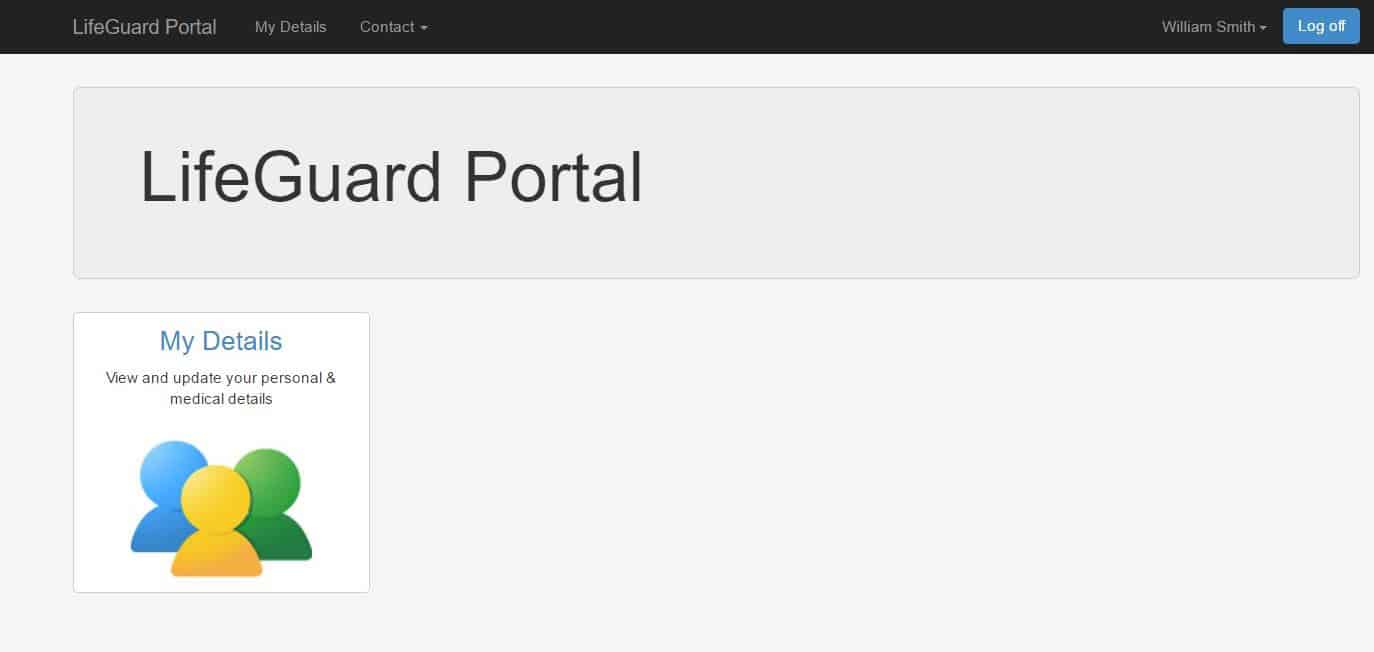
Log into the Client Portal and click My Details.
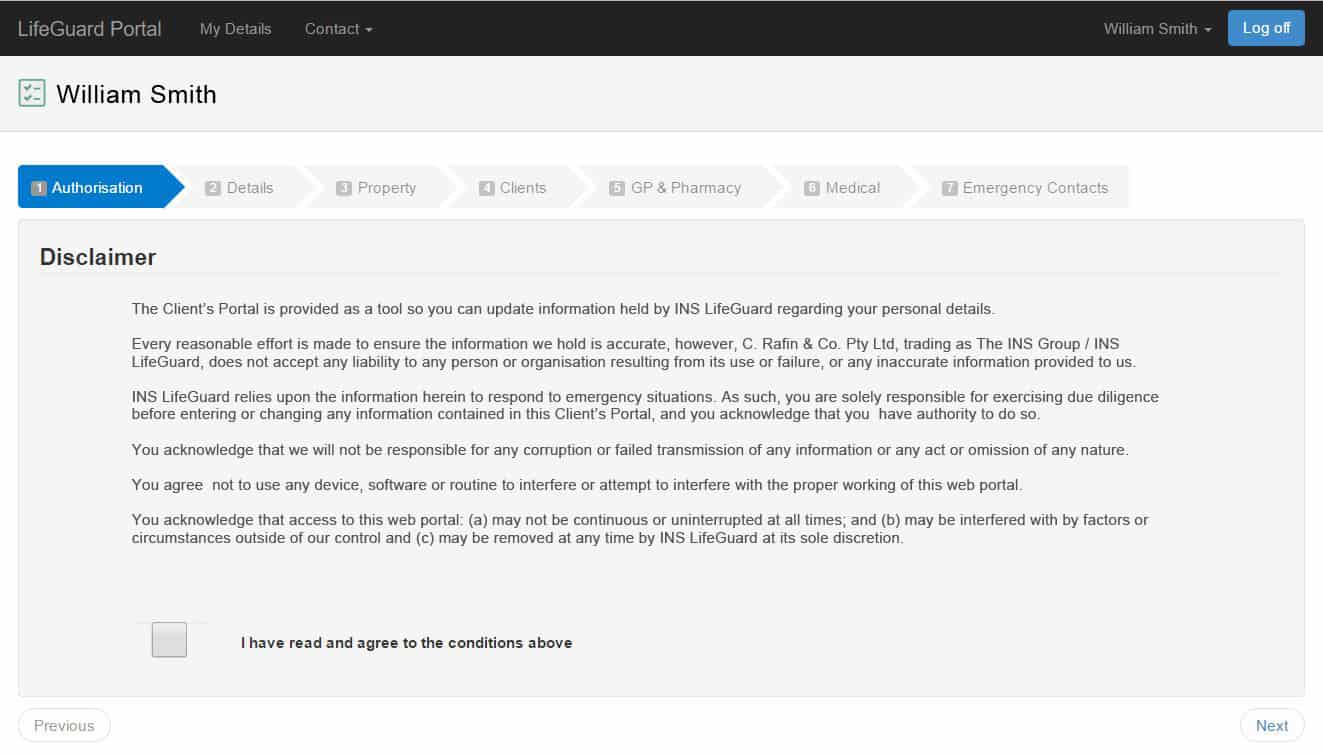
You will see a Disclaimer advising of the importance of providing accurate information. You must read and agree to the statement by ticking the box, then click NEXT to continue.
Continue to click NEXT to advance through the screens until you reach the last one entitled Emergency Contacts. You may have to scroll to the bottom of the page to see the NEXT button.
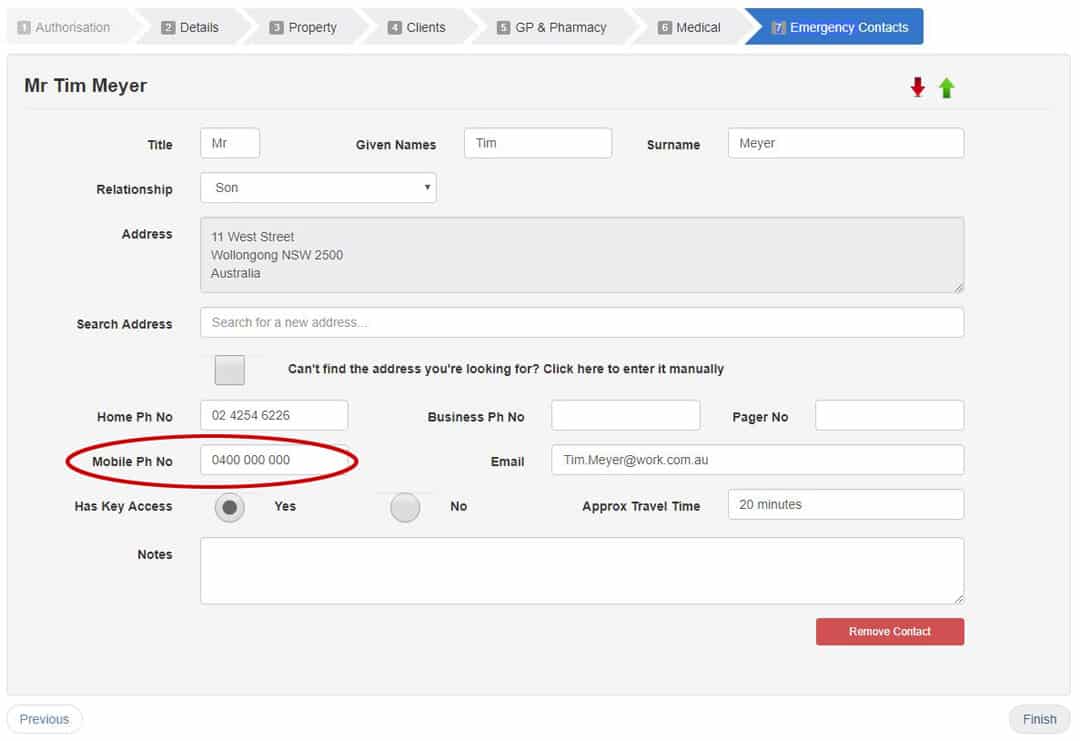
On this screen you will see the Emergency Contacts that have been set up for you and can edit the information as necessary. Note that the only information you must enter is the phone number that will be used to receive alarms. We recommend you use a mobile number.
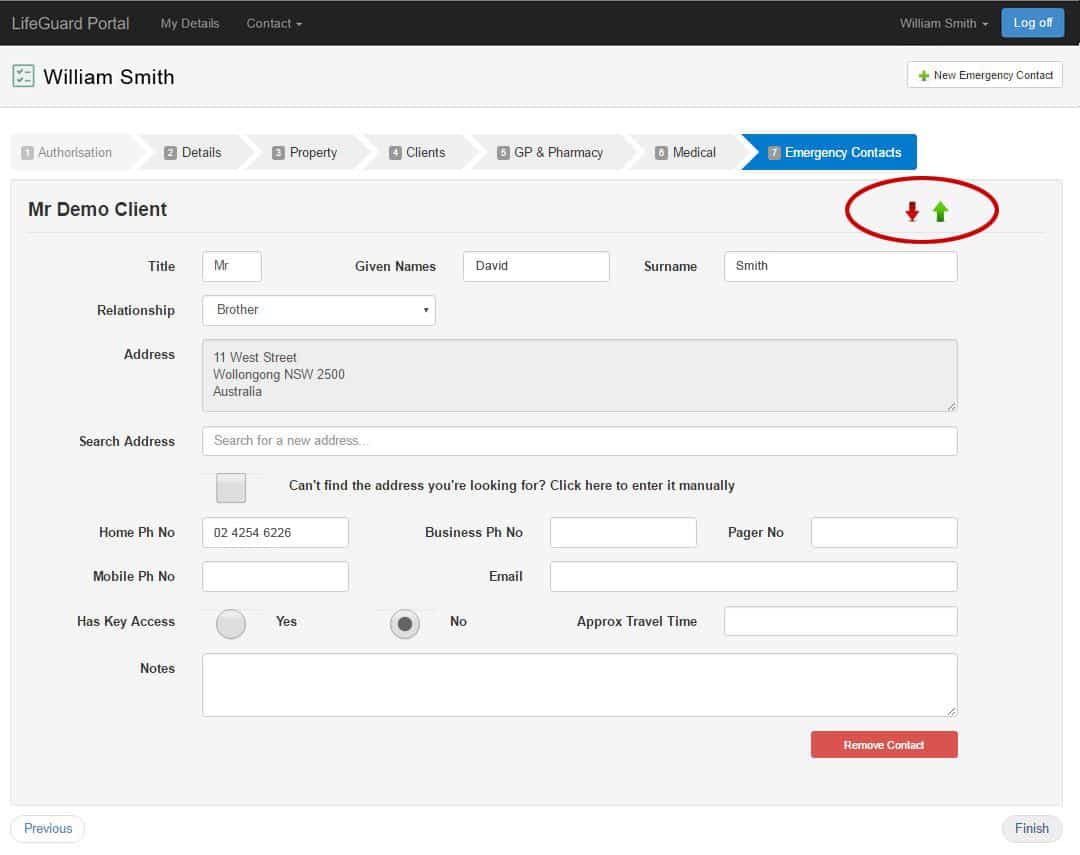
Should you need to change the order in which your contacts will receive the alarms, you can move one contact above another using the red and green arrows in the upper right corner.
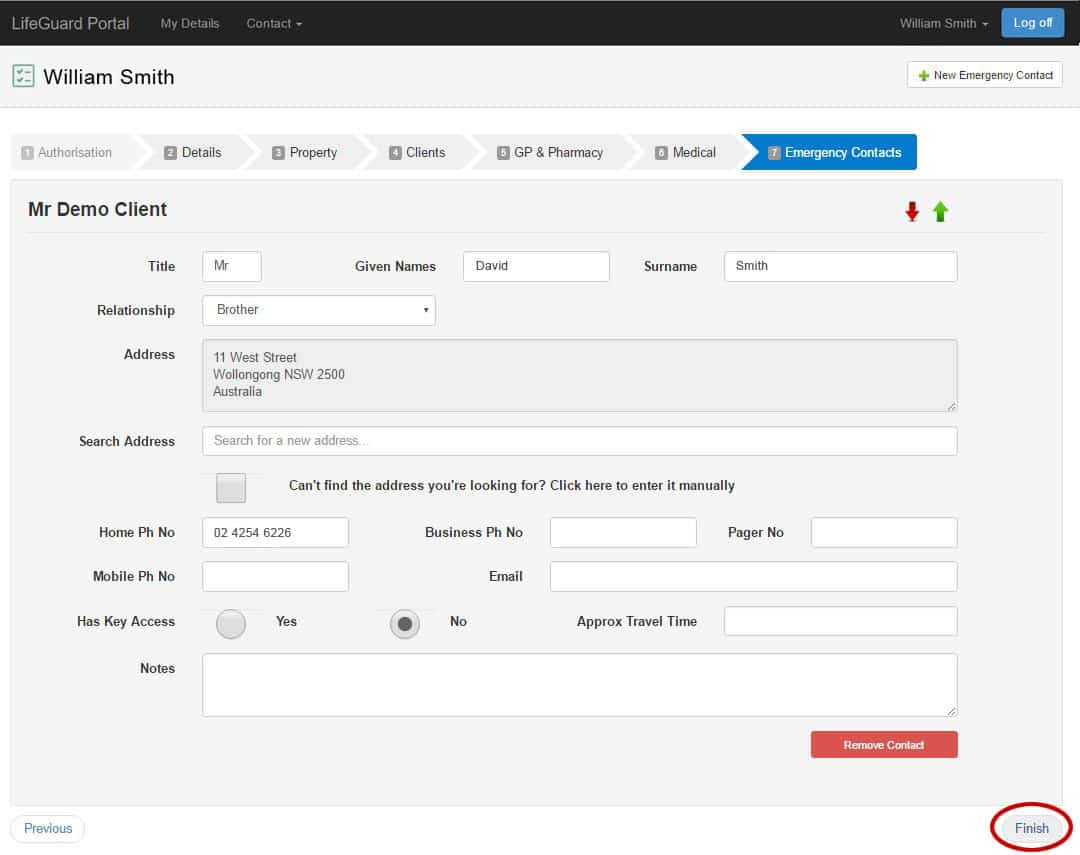
When you have finished making your changes, click the FINISH button in the lower right.
Troubleshooting
If your alarm system is not working as expected, please perform the basic trouble-shooting steps below in order before contacting INS for technical support.
1. Check the power
A correctly powered IP Dialler (IPD) will have a solid illuminated HELP button on the front of the unit. When charging or fully charged, the light next to the LAN port will be solid red.
A flashing HELP button on the front of the IPD below the screen means the IPD is not receiving power. Check the power point is switched on, and the plug is securely inserted in both the back of the IPD and the power point.
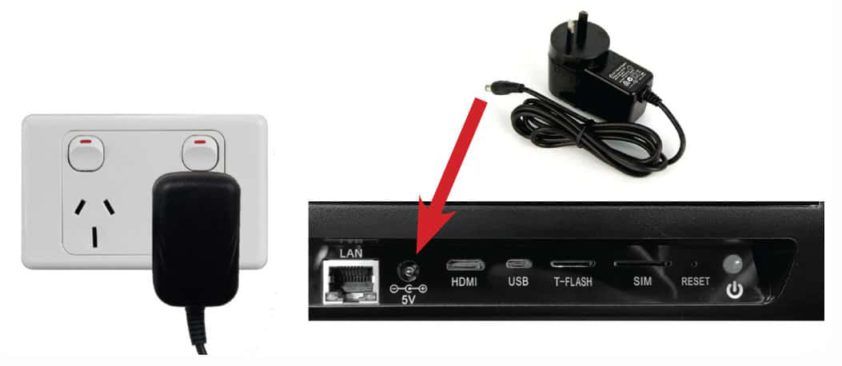
If it’s still not receiving power, change to another power point in another room. If it still isn’t working, you may have a faulty power pack. Contact INS LifeGuard to rectify the issue.
2. Check Network Connection
A data connection is necessary for the IPD to both send and receive alarms. You can check that your IP Dialler is online by looking for the green tick on the front of the screen. You should also be able to see a 4G symbol if you’re running off the SIM, or a Wi-Fi symbol if connected to your home Wi-Fi.
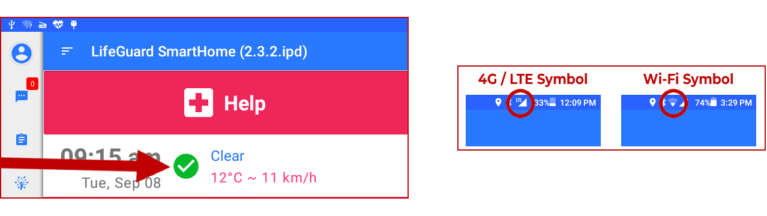
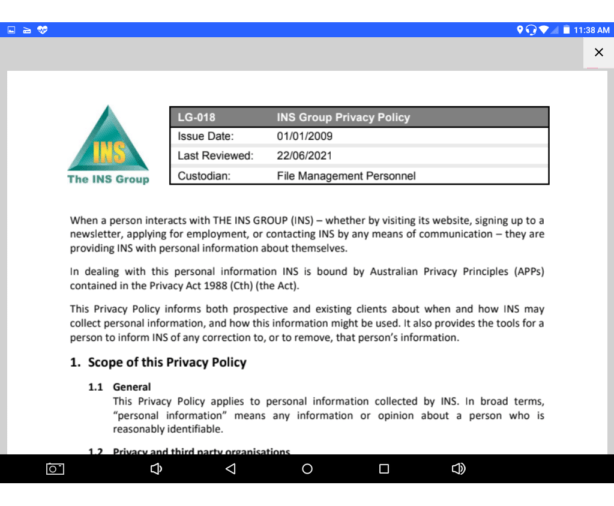
Another way to confirm you have a data connection is to check that your IP Dialler can load our Terms & Conditions or Privacy Policy. To do this, tap the menu icon, which resembles three lines and appears in the top left corner of the dialler screen as shown below.
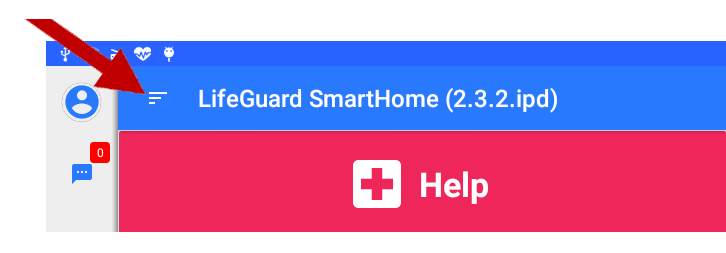
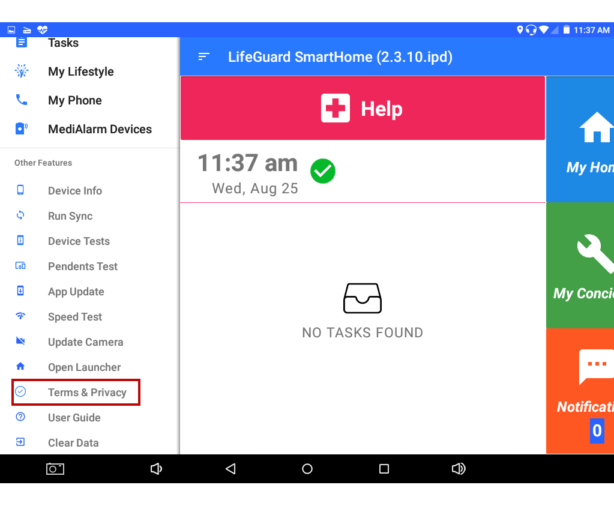
In the Menu that pops up, scroll down and tap
Terms & Privacy.
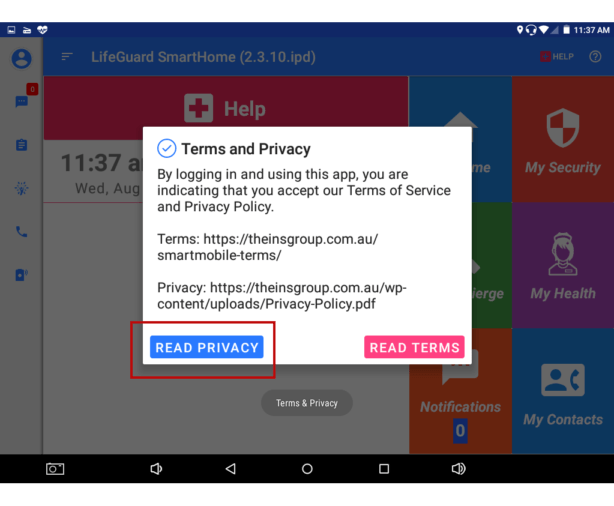
In the box that pops up, tap either
Read Privacy
or
Read Terms.
Wait a moment and the chosen document should load successfully. If it does, rest assured that you do have a data connection.
3. You May Require an External Antenna
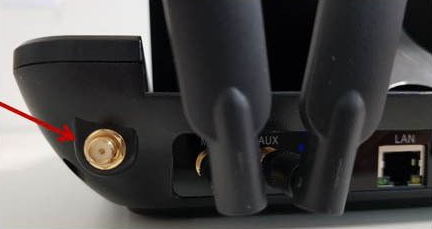
Your IPD is equipped with an internal WiFi antenna. Should the WiFi signal be weak, you can attach another antenna to obtain better WiFi signal.
If the signal strength is still weak, an external or high gain antenna may be required. If so, it must be connected to the gold WiFi terminal at the back of the IPD.
4. Check the SIM Card
Check that the SIM card was inserted properly. The SIM card can be found in the SIM slot at the back of the unit near the right side.

To remove the SIM, ensure the unit is turned off, then push the SIM and a spring will release it from the unit.
To insert the SIM, ensure the gold surface is facing up, and the side with the cut corner is the leading edge so it goes in first.
Check the APN, or Access Point Name. If the SIM is inserted properly and you still can’t get a data signal, confirm the APN has been set properly.
tap the left drop-down menu, which resembles three lines and appears in the top left corner of the screen as shown below.
Then in the
App Menu, select
System Settings.

Under Wireless & networks, tap … More.
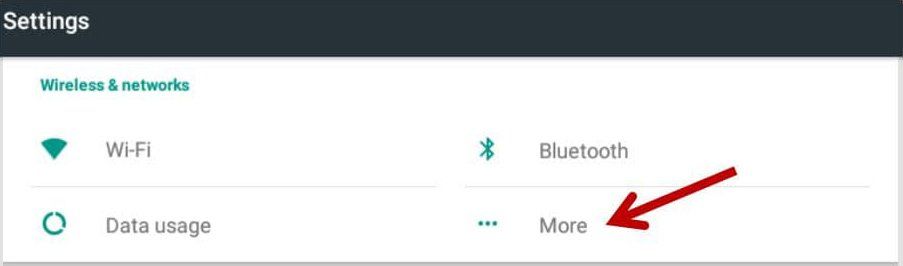
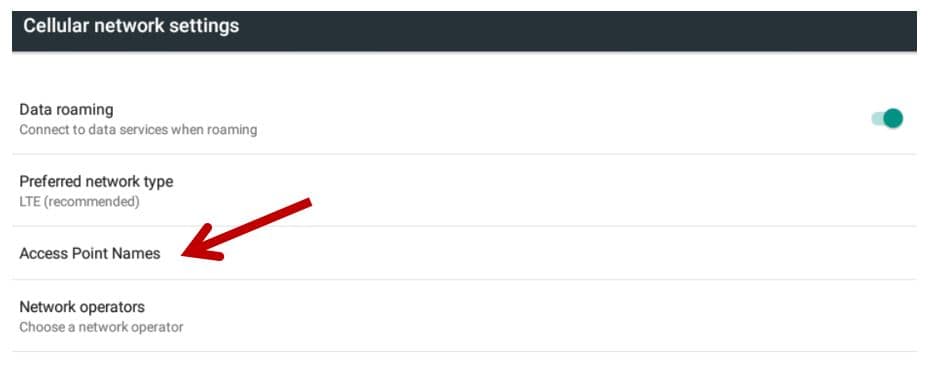
Then tap Cellular networks as shown below.
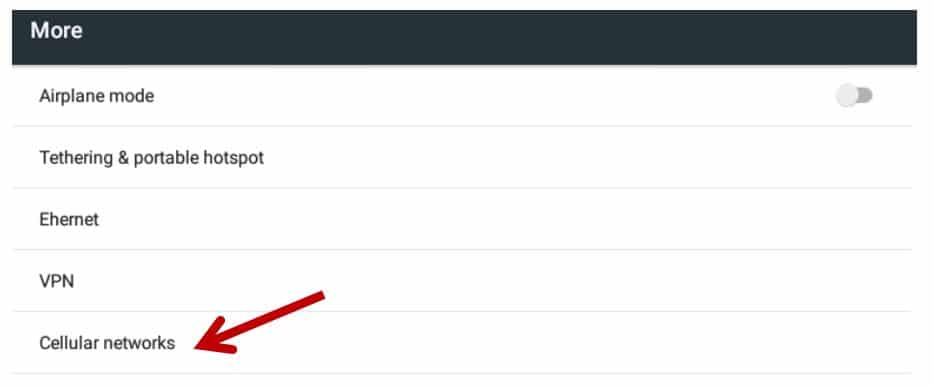
Next tap Access Point Names.
On the APN screen, check that the first option, Vodafone AU, is selected (green dot to the right). If not, tap it to select it.
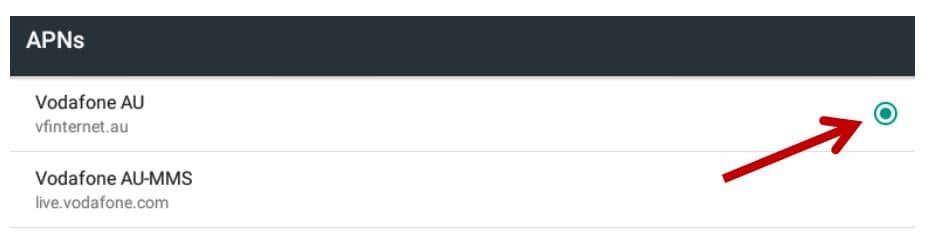
If the above options are not visible on your IPD, you can edit them or add a new APN.
NOTE: The SIM that came with your device will remain active for 30 days. After 30 days, you can switch to our professional monitoring service to keep using the provided SIM. If you wish to continue being monitored by family and friends, you’ll need to supply a new SIM and install it in the unit. We will contact you prior to the 30 days expiring to remind you of your options. If you do supply your own SIM, you will need to contact your SIM provider to determine the correct APN settings to use.
Requesting Technical Support
If you’ve completed all the steps under the Troubleshooting tab on this page and still require assistance, please contact INS LifeGuard’s technical support team on
1800 870 410. Alternatively, you can send us a message by clicking
Leave a Message in the bottom right corner of this screen.
FAQs
The INS Group
The INS Group values your privacy. Find out how we may collect and handle your personal information and how this information might be used.
Privacy Policy
Last updated 22nd October 2025.
When a person interacts with THE INS GROUP (INS) – whether by visiting its websites, downloading and using its mobile apps, signing up to a newsletter, applying for employment, or contacting INS by any means of communication – they are providing INS with personal information about themselves.
In dealing with this personal information INS is bound by Australian Privacy Principles (APPs) contained in the Privacy Act 1988 (Cth) (the Act).
This Privacy Policy informs both prospective and existing clients about when and how INS may collect personal information, and how this information might be used. It also provides the tools for a person to inform INS of any correction to, or to remove, that person’s information.
1. Scope of this Privacy Policy
1.1 General
This Privacy Policy applies to personal information collected by INS. In broad terms, “personal information” means any information or opinion about a person who is reasonably identifiable, including their health data, vital signs and medical information.
1.2 Privacy and third party organisations
This Privacy Policy only applies to INS. It does not apply to any other company or organisation, including organisations whose digital services are linked to INS’s online content or services (such as social media platforms and online retailers); or any third party organisations who might be involved in the delivery of a service provided, or contracted to be provided, by INS. If a person is using a third party website to interact with INS, or a person navigates from the INS websites to a separate website to view advertising or to engage with a service, this activity is not covered by INS’s Privacy Policy.
2. Collection of personal information
2.1 INS may collect, store and use a wide range of personal information in the course of its operations to enable INS to conduct its business, and to meet its legal obligations.
2.2 INS may collect personal information about a person for the following purposes:
- To provide a product or service requested by that person;
- To improve the delivery of INS’s services – by collecting information, it is possible for INS to adapt its services to meet a person’s preferences and thereby enhance their use of INS’s services.
- To assess a person’s employment suitability with INS – this includes reviewing the performance of a person already employed by INS; or assessing a person’s suitability who is applying for employment, a temporary work-experience placement, or an internship.
2.3 In some circumstances, INS may source information about a person which is on the public record, or can be requested from third parties. For example, when a person applies for a job at INS, INS will seek information from that person directly, but may also collect information from third parties (including previous employers and recruitment consultants).
2.4 INS may collect, store and use the following kinds of personal information:
- Information about a person’s computer and about their visits to and use of its websites, including server IP address, top-level domain name (e.g. .au, .com, .gov), the date and time of the visit(s), the pages accessed and documents downloaded, advertising click-through metrics, the previous website visited, and the type of browser used;
- Information provided by a person to INS when subscribing with the INS websites to receive email notifications and/or newsletters;
- Information that a person provides to INS when registering with its websites or registering to use its mobile applications;
- Information that a person provides to INS when completing their client profile, either through completing applications or other forms, registering to use its mobile applications, or by INS recording the information that a person provides via telephone calls, interviews or other forms of communications;
- Location data, which is only collected via the mobile applications when users trigger an emergency alarm, and which is only used to send an ambulance to the user’s location, if needed (INS does not share location data with any third parties);
- Information contained in any correspondence that a person sends to INS either directly or through its websites;
- Any other personal information that a person chooses to send INS.
2.5 INS and third parties contracted by INS make use of tracking device to enhance the functionality of its websites, including the use of cookies (flash and non-flash) and web beacons. These tracking devices are not used to record any personal information (such as names, email address). If a person chooses to opt out of these tracking devices that person may not be able to access all of the services on the INS websites. More information about opt-out options is available at www.youronlinechoices.com.au.
2.6 Some INS services and websites are integrated with third party social media services like Facebook or Twitter. A person can decide to access or log-in to the INS website using their social media profile, or to connect an INS-related service to a third party social media service. If a person does this, the information INS can collect may include their social media user ID information, and any further information that the person has permitted the social media site to share with INS. If a person accesses or connects to INS services via social media, they are consenting to INS collecting, storing, using and disclosing such information and content for any purpose, and at INS’s absolute discretion.
2.7 Any posts made via social media on INS platforms may be publicly available and able to be found via search engines. INS strongly recommends that all users become familiar with the privacy settings and terms of use of social media accounts.
2.8 INS will only collect personal information about a person from that person unless it is unreasonable or impracticable to do so.
3. Using Personal Information
3.1 INS may use a person’s personal information for the following purposes:
- Administer its websites and business;
- Personalise its websites;
- Enable a person to use of the services available on its websites;
- Supply services purchased through its websites;
- Send non-marketing commercial communications;
- Send email notifications that have been specifically requested;
- Send marketing communications relating to INS, its business, industry or carefully-selected third parties;
- Deal with enquiries and complaints made by or about a person relating to the INS websites;
- Keep its websites secure and prevent fraud;
- Verify compliance with the terms and conditions governing the use of the INS websites.
3.2 When INS collects personal information from a person, such a person will generally be informed of the nature of the information that has been collected, the reason why it was collected, and how INS will use it.
3.3 No attempt will be made to identify INS website users or their browsing activities except as required by a law enforcement agency exercising a warrant to inspect the service provider’s logs.
3.4 Any person interacting with INS consents for INS to store, use, or disclose any personal information that it has collected for any purpose specified in:
- This policy; or
- The relevant pages of the INS websites; or
- The Privacy Act 1988; or
- Any other law that has jurisdiction over the State or Country in which INS operates.
3.5 Consent, as described in clause 3.4 above will only be taken to have been withdrawn by a person when that person sends written notice to INS’s Privacy Officer explicitly withdrawing consent for their personal information to be used or disclosed by INS for any or all purposes.
3.6 You consent to third parties who hold personal information about you, including but not limited to: doctors, nursing homes, an aged care facility, hospital, or emergency services personnel, to disclose any personal information about you to INS on the request of INS.
4. Disclosing personal information
4.1 INS may disclose personal information for the following purposes:
- To provide a service that a person has requested;
- To measure a person’s experience with INS’s services;
- To customise, enhance or improve INS’s services;
- To provide technical support, or respond to an enquiry;
- If permitted or required by law;
- To prevent or lessen a serious and imminent threat to a person’s life or health; or
- For the purposes to which a person has consented to the disclosure (this may be express or implied).
- To disclose information to any entity including a doctor, nursing home, or aged care facility, hospital, or to emergency services personnel, in a situation which INS deems is reasonably necessary during the provision of an INS service.
4.2 Without limiting clause 4.1 above, INS may disclose personal information:
- To the extent that INS is required to do so by law;
- In connection with any ongoing or prospective legal proceedings;
- In order to establish, exercise or defend INS’s legal rights; and
- To the purchaser (or prospective purchaser) of any business or asset to whom INS is (or is contemplating) selling.
4.3 If data about a person’s use of INS’s digital services is de-identified, aggregated or otherwise made anonymous, INS may collect, use and share that information for any purpose with third parties provided that in doing so INS does not reveal any personal information and the use is related to INS ’s activities.
4.4 In providing and managing the services offered by INS, INS may make personal information available to third party services and content providers, including providers of cloud services, website hosts, and other companies.
4.5 Information that INS collects may be disclosed to third parties who operate overseas in order to enable INS to use the information in accordance with this policy.
4.6 INS will direct third parties who receive personal information to follow the same standards and obligations set out in this policy. However, INS does not take responsibility for the use of this information by third parties, particularly those operating overseas in countries which do not have data protection laws equivalent to those in force in Australia.
5. Anonymity and pseudonymity
5.1 Any person may interact with INS anonymously or under a pseudonym if they so choose. Where this is the case, INS may only be able to provide such a person with limited information or services.
5.2 In some cases it will not be practicable to interact with a person anonymously, or it may be impossible to provide the service that a person has requested without some form of personal information. For example, if a person wishes to subscribe to an INS email newsletter, an email address must be provided.
6. Access and correction
6.1 A person is entitled to obtain access to records that contain personal information about him or her, except to the extent that INS is required or authorised to refuse access under any law of the Commonwealth that provides for access by persons to documents (e.g. the Freedom of Information Act 1982 (Cth)).
6.2 A person can obtain access to documents containing his or her personal information, as well as request that such information be corrected by INS, by contacting the INS Privacy Contact Officer. The INS Privacy Contact Officer will endeavour to respond to requests for access and correction in a timely manner.
6.3 INS will take reasonable steps to ensure that the personal information it holds is accurate, relevant to its purpose, up to date, complete and not misleading.
7. Storage and security
7.1 Depending on how INS receives a person’s personal information, INS may store it in electronic and/or hard copy format.
7.2 INS takes such steps as are reasonable and practicable to ensure that the personal information it holds is protected against interference, unauthorised access and other forms of misuse. Measures taken may be physical, electronic, or procedural. INS staff are trained to treat personal information with care, and to use it in accordance with this Privacy Policy and current laws.
7.3 In instances where a person uses a third party platform to engage with INS, including but not limited to social media platforms, the person acknowledges that these platforms are not under the control of INS. Where a person has concerns over the security of any third party platform, INS encourages the careful consideration of the terms and conditions and security used by any third party platform.
7.4 Any person who interacts with INS online or the INS websites acknowledges that the transmission of information over the internet is inherently insecure, and that INS does not guarantee the security of data sent over the internet.
7.5 INS will ensure that upon becoming aware of holding personal information about a person and such information is either no longer required by INS, or that INS is not required by or under Australian law to retain the information; INS will take reasonable steps to destroy the information or to ensure that the information is de-identified.
7.6 Where INS provide a mobile app on a Google or Apple platform, users will be able to initiate the deletion of their account with INS (including any associated information linked to that account) through the mobile app. INS will take reasonable steps to destroy information associated with the user's accounts when deleted subject to INS retaining any information it is required to retain pursuant to Australian laws or this Privacy Policy.
7.7 INS may retain personal information, communications, billing, and any other information and data up to a period of 7 years after the termination of any contract or engagement with INS in accordance with INS Data Retention and Destruction Policy. Such information and data retention practice are reasonably necessary for INS to perform its functions and activities.
8. Complaints
8.1 If a person believes that an act or practice of INS has interfered with their privacy they may make a complaint to INS. Such a person will need to identify themself and provide his or her complaint in written form and addressed to the INS Privacy Contact Officer
8.2 The INS Privacy Contact Officer will investigate all complaints and will endeavour to provide a written response within 30 days of receipt of the complaint setting out INS’s decision.
8.3 If a person is dissatisfied with INS’s response to his or her complaint, he or she has the right to take their complaint to the Office of the Australian Information Commissioner. The Australian Information Commissioner may then investigate and attempt to conciliate the matter.
9. Cookies
INS and third parties contracted by INS make use of tracking device to enhance the functionality of its websites, including the use of cookies (flash and non-flash) and web beacons. These tracking devices are not used to record any personal information (such as names, email address). If a person chooses to opt out of these tracking devices that person may not be able to access all of the services on the INS websites. More information about opt-out options is available at www.youronlinechoices.com.au.
10. Relevant contacts
Further information about INS’s Privacy Policy can be obtained by contacting the INS Privacy Contact Officer.
Telephone: (02) 42 546 226
Free call: 1800 676 336
Post: Privacy Contact Officer, THE INS GROUP, P.O. BOX 485, Unanderra NSW 2526
Email: privacy@theinsgroup.com.au
Website: www.inslifeguard.com.au
Contact the Office of the Australian Information Commissioner (OAIC)
Contact details are set out on the OAIC website:
https://www.oaic.gov.au/privacy/privacy-complaints
Telephone: Enquiries line: 1300 363 992
If calling from outside Australia call +61 2 9284 9749
TTY: call 133 677 then ask for 1300 363 992
Speak and Listen users: call 1300 555 727 then ask for 1300 363 992
Internet relay users: connect to the National Relay Service then ask for 1300 363 992
Facsimile: (02) 9284 9666
Email: enquiries@oaic.gov.au
Post: GPO Box 5218, Sydney NSW 2001
Website: www.oaic.gov.au
Click below to view or download our Privacy Policy as a PDF.